Lone Star Software Symposium: Dallas
May 18 - 20, 2012 - Dallas, TX
View the event details here ».
Howard Lewis Ship
Creator of Apache Tapestry
Howard Lewis Ship is the creator and lead developer for the Apache Tapestry project, and is a noted expert on Java framework design and developer productivity. He has over twenty years of full-time software development under his belt, with over ten years of Java. He cut his teeth writing customer support software for Stratus Computer, but eventually traded PL/1 for Objective-C and NeXTSTEP before settling into Java.
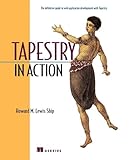
Howard is respected in the Java community as an expert on web application development, dependency injection, Java meta-programming, and developer productivity. He is a frequent speaker at JavaOne, NoFluffJustStuff, ApacheCon and other conferences, and the author of "Tapestry in Action" for Manning (covering Tapestry 3.0). Lately, he's been dipping his toes into alternate languages, including Clojure.
Howard is an independent consultant, offering Tapestry training, mentoring and project work as well as training in Clojure. He lives in Portland, Oregon with his wife Suzanne, and his children, Jacob and Olivia.
Presentations
Testing Web Applications with Geb
If you build web applications and cringe at the phrase "but how are we going to test it?" you're going to love Geb: the browser automation and testing tool. Geb is a Groovy framework for testing web applications: it builds on Selenium, but draws ideas from jQuery and elsewhere to make it productive and fun to test your applications in-browser.
Geb is rich with ideas to keep your tests clear, concise and maintainable. It is useful in all major testing frameworks: JUnit, TestNG, and Spock. We'll see how to navigate around the browser, clicking links, submitting forms, and verifying results. We'll also see Geb Pages and Modules, which allow you to define elements inside a page once, and reference them across many tests. Basically, Geb removes the excuses for not testing your web application, and that's a great thing!
Backbone.js: Run Your Application Inside The Browser
Follow the trends and you'll notice that, increasingly, web applications are running in the browser. That can be great news … until you have to write the JavaScript for all that client-side behavior. Fortunately, a new breed of client-side MVC frameworks have emerged, including Backbone.js. You still have controllers, models, and views … just in the browser.
Backbone might seem familiar, especially to Rails developers: it has the models, controllers, and views you'd expect in a server-side framework … but it all runs in place, inside the browser. The server ends up as the source & sink of data. We'll investigate the basics of using Backbone, how to create dynamic, interactive views, and how to get and save data. We'll see how concise and readable the JavaScript can be, especially when using CoffeeScript. Much of the complexity of modern web applications simply falls away when all rendering and client logic moves to the browser … as long as you have a proper backbone to hang that logic on.
Modern Application Foundations: Underscore and Twitter Bootstrap
We're all increasingly in the business of writing richly interactive applications using HTML and JavaScript … that's a given. But the devil's in the details, and most applications get those details wrong. Building visually attractive applications that work in all browsers takes a lot of work ... and good as jQuery is, as more logic moves to the browser, something as sophisticated as jQuery is needed for data, not DOM, and that's Underscore.
Applications are moving from the server into the browser, and that can be a good, and rewarding, thing ... but compared to the rich infrastructure available to any Java program, what's available to JavaScript running in the browser is pretty anemic. jQuery is great at manipulating the DOM, but rich client applications do a lot more than that, and too often, this leads to lots of code and lots of bugs.
Underscore is your client-side infrastructure: a set of unobtrusive functional programming tools that can make your JavaScript slick, performant, readable ... and compatible with older browsers.
However, Underscore doesn't make your application look pretty: that's the job of Twitter's Bootstrap: a standard set of CSS rules that give your applications a modern "Web 2.0" look and feel. Bootstrap is developed by experts to look good across all the major browsers. We'll dive into how to use Bootstrap: how to get good looking results up quickly, how all the CSS classes work together, and how to get even better results using the bundled jQuery plugins.
Books
by Howard M. Lewis Ship
-
The creator of Tapestry details how to use this new framework's components to create rich web-based GUIs using links, images, and HTML forms. The challenges of web application development are discussed, such as managing server-side state properly, application localization, and maintaining synchronization between the client web browser and the application server. At the same time, the benefits of a clean separation between presentation logic and business logic and how well Tapestry succeeds in keeping these two concerns apart are identified. Written for new Tapestry users and even developers new to creating web applications in general, this guide includes extensive notes on development "gotchas," including common Tapestry errors and how to fix them. Advanced techniques are covered as well, including creating entirely new components, integration with traditional servlet and JSP applications, and creation of client-side JavaScript. Finally, a complete J2EE application, the Virtual Library, is presented and analyzed in detail.
-
The creator of Tapestry details how to use this new framework's components to create rich web-based GUIs using links, images, and HTML forms. The challenges of web application development are discussed, such as managing server-side state properly, application localization, and maintaining synchronization between the client web browser and the application server. At the same time, the benefits of a clean separation between presentation logic and business logic and how well Tapestry succeeds in keeping these two concerns apart are identified. Written for new Tapestry users and even developers new to creating web applications in general, this guide includes extensive notes on development "gotchas," including common Tapestry errors and how to fix them. Advanced techniques are covered as well, including creating entirely new components, integration with traditional servlet and JSP applications, and creation of client-side JavaScript. Finally, a complete J2EE application, the Virtual Library, is presented and analyzed in detail.