http://code.google.com/p/jmx-logger/
JmxLogger
JmxLogger makes it easy to broadcast your Java Logging or your Log4J log events as JMX notifications. As such, you can easily monitor your application's activity logs in real-time. Using familiar logging API and configuration mechanism (i.e. log4j.xml or Java Logging properties file), developers can quickly integrate realtime application log monitoring into their existing deployed code. All it takes is a logging configuration change.
The JmxLogger API provides a Java Logging Handler and a Log4J Appender which can be used to integrate between your favorite logging framework and JMX. JmxLogger hides the complexity of dealing with JMX. You simply configure your logging framework as you normally do, and that's it. You are ready to broadcast your logging events as JMX notification events.
Features
- Support for Java Util Logging API
- Support for the Log4J logging API
- Easy integration with your favorite logging framework
- No coding required, simply configure your logging framework to get started.
- Specify and control the level of event to broadcast
- Monitor event through a console or listener scripts
- Realtime monitoring of your application activity logging via JMX.
Getting Started
- Download the jar (generic or with log4j support)
- Add jar to your classpath (in case of Log4J, you will need log4j.jar on your classpath)
- Configure your favorite logging framework
- Use JMX console (JConsole or VisualVM) to monitor your log actvities.
JmxLogger Events
When you log your application events using either Java Logging or Log4J (see project site for more detail), your log events will get routed to the JmxLogger Java Logging Handler or Log4J Appender defined in your application's logging configuration file.
Below you can see a configuration that sends log messages to the Console and a JmxLogger Logging Handler.
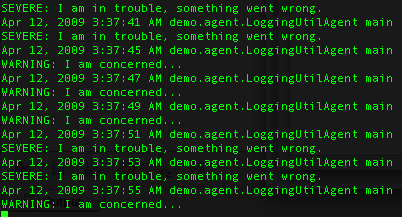
Using a command-line Console you can see your log message messages as they are logged in your application.
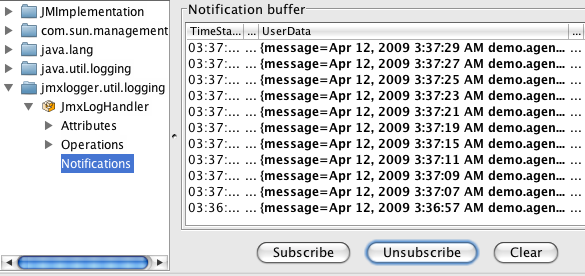
The same log events are also emitted as JMX notifications. Using JConsole, you can see these events as they are logged in your application in real-time.
That's it! You have seen how JmxLogger can effortlessly integrate JMX and the two standard logging API's available (Java Logging and Log4J).